Follow us on FB

Showing posts with label Toturials. Show all posts

Tuesday, March 4, 2014

Free Online TV Channels on VLC Player

VLC is a open source media player software . 
Everyone use VLC for videos but some of them know that how we  Watch Free Online TV Channels In VLC Player.

VLC Streaming Overview

The best thing about VLC player is that it runs on all platforms Windows, Linux, MAC OS X, Unix.

Watch Free Online TV Channels In VLC Player – Guide

Step#1

Open VLC media player. If you don’t have then Install VLC player on your PC

Step#2

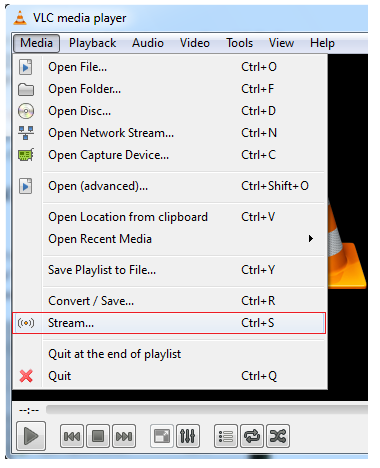
Go to the ‘MEDIA’ from MENU BAR and select ‘STREAM’.
Watch Free Online TV Channels In VLC Player

Step#3

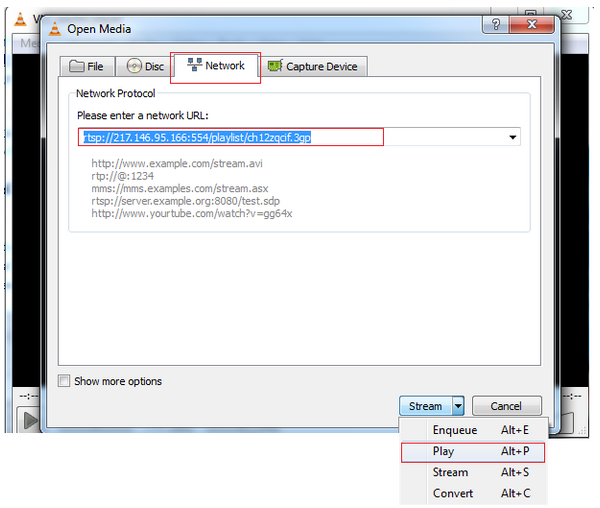
Now go to the third tab ‘NETWORK’ .Enter the URL of your favourite channel which you want to watch .
For Example: URL of B4U Music channel – rtsp://217.146.95.166:554/playlist/ch12zqcif.3gp
On the right side there is ‘Stream dropdown’. Select ‘PLAY’.
stream Online TV Channels In VLC Player
Now you have learnt how to stream free online channels in VLC media player. You can get URL of your favourite TV channels easily by simply search URL of your fav channel on Google. Enjoy Watching!

Streaming URLs of Other TV Channels


FOR RK NEWS
rtsp://94.75.250.53:554/rtplive/rknews.sdp 

RAJ News 
rtsp://94.75.250.220:1935/live/rajnews2.sdp

FOR ETV 
rtsp://94.75.250.53/rtplive/etv2low.sdp 

FOR Studio N
rtsp://94.75.250.220:1935/live/studion2 

FOR SVBC
rtsp://94.75.250.220/rtplive/svbclow 

For Zoo Vision 
rtsp://stream.zoovision.com/live.sdp 

For B4u Music 
rtsp://217.146.95.166:554/playlist/ch12zqcif.3gp

For iMusic
rtsp://217.146.95.166:554/playlist/ch26yqcif.3gp

For Zee Tamil
rtsp://121.244.145.226:554/prf1/cid_54.sdp

For Zee Kannad
rtsp://121.244.145.226:554/prf1/cid_55.sdp 

For Zee Bangla
rtsp://121.244.145.226:554/prf1/cid_52.sdp

For Music Box
rtsp://stream.the.sk/live/musicbox/musicbox-3m.3gp

For Bella Tv
rtsp://217.146.95.166:554/playlist/ch29yqcif.3gp

For Fashion Tv
rtsp://217.146.95.166:554/playlist/ch27yqcif.3gp

For Adventure
rtsp://video3.multicasttech.com/AFTVAdventure3GPP296.sdp 

FOR Horror 
rtsp://video2.multicasttech.com/AFTVHorror3GPP296.sdp 

FOR Comedy
rtsp://video3.multicasttech.com/AFTVComedy3GPP96.sdp 
FOR Classic 
rtsp://video3.multicasttech.com/AFTVClassics3GPP296.sdp

For Crime
rtsp://video2.multicasttech.com/AFTVCrime3GPP296.sdp

For Mystery 
rtsp://video2.multicasttech.com/AFTVMystery3GPP296.sdp

For Clubbing Tv 
rtsp://217.146.95.166:554/playlist/ch21yqcif.3gp 

-aajtak
rtsp://ss1c6.idc.mundu.tv:554/prf0/cid_4.sdp
- times now
rtsp://ss1c6.idc.mundu.tv:554/prf0/cid_2.sdp
-headlines today
rtsp://ss1c6.idc.mundu.tv:554/prf0/cid_7.sdp
-ndtv 24*7
rtsp://ss1c6.idc.mundu.tv:554/prf0/cid_29.sdp
- ndtv profit
rtsp://ss1c6.idc.mundu.tv:554/prf0/cid_31.sdp
- ndtv goodtimes
rtsp://ss1c6.idc.mundu.tv:554/prf0/cid_32.sdp
- ndtv india
rtsp://ss1c6.idc.mundu.tv:554/prf0/cid_33.sdp
-cnbc awaaz
rtsp://ss1c6.idc.mundu.tv:554/prf0/cid_34.sdp
- cnbc Tv18
rtsp://ss1c6.idc.mundu.tv:554/prf0/cid_35.sdp
- zee business
rtsp://121.244.145.226:554/prf0/cid_45.sdp
- zee marathi
rtsp://121.244.145.226:554/prf0/cid_38.sdp
-zee tv
rtsp://121.244.145.226:554/prf0/cid_41.sdp
- zee regional
rtsp://121.244.145.226:554/prf0/cid_50.sdp
- zee regional
rtsp://121.244.145.226:554/prf0/cid_52.sdp
- zee regional
rtsp://121.244.145.226:554/prf0/cid_54.sdp
- zee regional
rtsp://121.244.145.226:554/prf0/cid_55.sdp
- ten action
rtsp://121.244.145.226:554/prf0/cid_61.sdp
- etc
rtsp://121.244.145.226:554/prf0/cid_62.sdp
- zing
rtsp://121.244.145.226:554/prf0/cid_65.sdp
-zee classic
rtsp://121.244.145.226:554/prf0/cid_57.sdp
zee smile
rtsp://121.244.145.226:554/prf0/cid_58.sdp
Monday, March 3, 2014

How To Use Winrar For Creating Archive, Zip and UnZip Files

How To Use WinRAR For Creating Archive

First of all if you do not have winRare the Download it from internet .
After Downloading install it and follow these Easy Steps :
Compressing 3 PDF files and creating RAR archieve. Usually people use it for the larger files. WinRAR reduces the size of a file into RAR and ZIP file format.
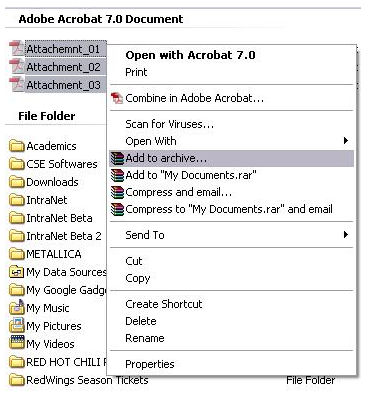
1) Select the files which you want to compress and do a Right Click on the selected files. Choose ‘ADD TO ARCHIEVE’.
How to use Winrar for Creating Archive


2) New window will prompt.Choose RAR format

how to create archive in winrar

WinRAR GENERAL TAB


1)ARCHIEVE NAME:
a) ZIP extension(.ZIP)- can be opened with WinRAR and WinZip.
b) RAR extension(.RAR)-can be opened with WinRAR but not with WinZip.
2)COMPRESSION MODE: Choose always ‘NORMAL’.
3)SPLIT METHOD: leave it Blank now.
4)UPDATE MODE: Add and replace file.
5)ARCHIEVE OPTION: donot select any.

ADVANCED Settings TAB in WinRAR

Set the password if you want to make your file password protected.Remember your password if you forgot it there is no way to unZip it.
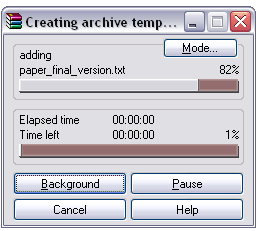
3) when you are ready to zip the file.Click ‘Ok’. WinRAR will start to compress .
winrar 03

How To Use WinRAR For Extract/Unzip/Decompressing

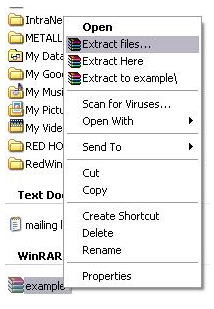
1) Right Click on the RAR or ZIP file anwinrar 04choose the ‘EXTRACT FILES…’
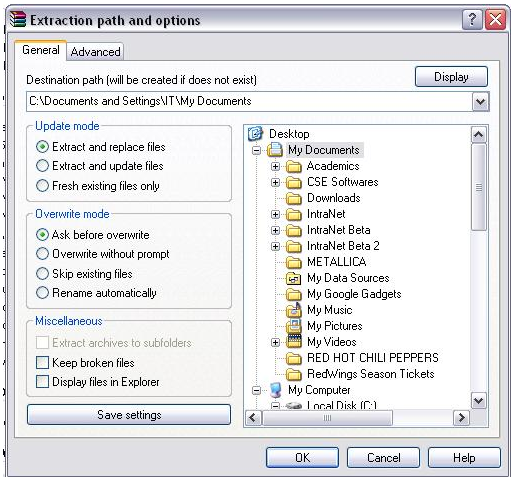
2) Extraction window will be prompt and select the destination where you want to unzip the file.
winrar 05
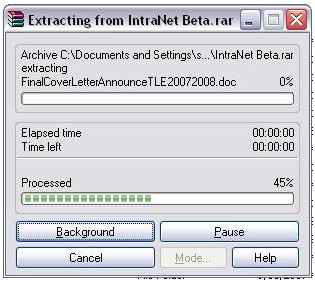
3)Click OK when destination is selected.Now WinRAR will start to UNZIPPING.
winrar 06

Sunday, March 2, 2014

how to create time delay in C++

Time delay in C++ means :
                                     Which you enter or gives input using Turbo C++  or dev , after compiling shows result as :
             
             Print Single letter then delay of few seconds and again show next letter of the word .
              The Uper Step do again and again till the string or pragraph end.
This is Very Simple and Easy mathod to create a time delay in C++ .
Every Step is explaned completely below .
Advantage :
There are few advantage of creating time delay in C++ as :
You can create introduction view in a uniqe style .

Creating game this is a very charming look .
After compiling print your result slow .
And many others .....................

Code of the Program :

#include <iostream>
#include <conio.h>
#include <string.h>
using namespace std;

void mydelay(int sec)            // Defining Delay Function
{
     int w,e;
     for(w=0; w<sec; w++)    // Making Nested Loop for More Time Consuming
     {
              for(e=0; e<1000000; e++)  // 1000000 for making time(printing) speed slow
              {
              }
     }
 }

int main()       // for Turbo Cplus plus write "void main( )"
{
   
    char name[]= "My Name is Haseeb Jaffur....";
    char web[] = "www.placeoflearn.blogspot.com and www.greatmasti4u.blogspot.com";
    int t=0;
    int get = strlen(name); // taking Length of String using "strlen( )" function
    int ln=strlen(web);
    cout << endl;
    cout<<"\n\t";
    while(t!=get)
    {                  
                        mydelay(55);
                        cout << name[t];
                        t++;
           }
           cout<<"\n\t";
           int i=0;
           while(i!=ln)
    {                  
                        mydelay(45);  // 45 will be passed to sec variable
                        cout << web[i];
                        i++;
           }
           cout<<endl;
    cin.get();           
    return 0;
}
// for implementing it in T.C remove 4th and  last line
                                                 // THANKS For Visiting ...
                                                  // by Haseeb Jaffur


If you face any Problem show in comment , i am try my best to resolve this problem .......

Saturday, March 1, 2014

Count Words in a String using dev/C++

Now i am trying to count the No of words in a string  using C++ or dev .  You can use this code to count the words . which you enter . this is a simple and easy article , which would help you to learn C++ complicated coding with explanations . 
I am write every code line explanation in front of that line.
after coding running you can get out put as............


Code for this program is below . but ..........
this Code in dev , if you use Turbo C++ then do some Changing...
remove using namespace std;
remove int main  and use void main in turbo C++ .
remove return and use getch() int Turboo C++ .

Code of Programe :

#include <iostream>
#include <conio.h>             //for getche()
using namespace std;
enum itsaWord { NO, YES };     //NO=0, YES=1
int main()
{
itsaWord isWord = NO;       //YES when in a word,
//NO when in whitespace
char ch = 'a';              //character read from keyboard
int wordcount = 0;          //number of words read
cout << "Enter a phrase:\n";
do {
ch = getche();           //get character
if(ch==' ' || ch=='\r')  //if white space,
{
if( isWord == YES )   //and doing a word,
{                  //then it’s end of word
wordcount++;       //count the word
isWord = NO;       //reset flag
}
}                     //otherwise, it’s
else                     //normal character
if( isWord == NO )    //if start of word,
isWord = YES;      //then set flag
} while( ch != '\r' );   //quit on Enter key
cout <<endl<< "---Word count is " << wordcount << "---\n";

return 0;

}


If you feel any problem in program running then post in comment ,
i try my best to resolve this problem ,,,,,,,,,,,
Thanks for Visiting.

Saturday, December 21, 2013

Car game in unity 3d

 
These are simple tutorials which tells you ,
how to create a car game in unity 3d .
By watching these videos you can learn step-by-step all rules and methods.
 Features:
  1. How to make terrain ?
  2. Insert textures , edit , modify .
  3. Insert Car , move , modify .
  4. Make roads , presentation .
  5. Import buildings .

Monday, November 11, 2013

New PHP+MySQL Video Tutorials in Urdu/Hindi (2013 Updated)

PHP-and-MySQL-training 

Download PHP & MySQL free video tutorials in Urdu

The course that I’m sharing here will be containing 35 video tutorials, which will teach you the basics of PHP and then the Basics of MySQL with practical working environment. I hope you’ll like this course a lot.

Monday, November 4, 2013

php in urdu

Learn php mysql in urdu with easy examples . I hope you like it .
Complete php mysql in 16 tutorials.
Download php mysql in urdu part 16-1 by Haseeb Jaffur

Monday, October 14, 2013

html in urdu


HTML in Urduhi , learn html in urdu with these videos.
HTML is a hyper text mark up language which is definitely used to create the basic structure of a website or web page. 


Monday, September 2, 2013

hy , this 1st tutorial web design for you.


thank you for watching.


Thursday, June 27, 2013

how we minus the distances

#include<iostream>
using namespace std;
     class Distance
                        {
      private:
              int feet;
              float inches;
      public:
             Distance()
                        {
                       feet=0;
                       inches=0;
                       }


Copyright @ 2013 placeoflearn.